Hi Everyone,
Here is the link for my web portfolio—http://www.behance.net/susanshutedesign. My projects are in reverse and I haven't figured out how to fix that yet. Other than that, though, I think it is pretty much done.
Please let me know what you think—the good, the bad, and the ugly.
This summer, I hope to create my own personal website—www.shutedesign.com. We'll see how that goes. Have any of you done a prosite on behance?
Showing posts with label Sue. Show all posts
Showing posts with label Sue. Show all posts
Monday, May 4, 2015

Friday, May 1, 2015
Portfolio Cover Page
I have two options here for my cover page for my portfolio. The first one is my preference but I wanted to run both of them by everyone. I like the simplicity of the first one and the message, while the 2nd one provides a sampling of what will be shown in the book overall. My concern with the 2nd one is that there is too much going on in one page.
Which version do you think is most effective?
NOTE: I added one more piece to my portfolio so that I could fill the grid of 12 pieces. I'll post that shortly. Also, I added a faint background on the black portion of the page. I am thinking of adding that to all of my pages in my portfolio. What do you think?


Which version do you think is most effective?
NOTE: I added one more piece to my portfolio so that I could fill the grid of 12 pieces. I'll post that shortly. Also, I added a faint background on the black portion of the page. I am thinking of adding that to all of my pages in my portfolio. What do you think?
Monday, April 27, 2015
IDENTITY—Stationery Designs
I've been playing around with several possibilities for my identity designs. Attached are six options. Please let me know which one(s) are the strongest in your estimation.
NOTE: The large SYIS will not print as darkly as it appears on screen.


Wednesday, April 1, 2015
Project #11 — Advising Wall and Pop-Up Banners
These banners were a freelance job for MWCC's Advising Department.
• The top three were 31.5"x80", 60"x80", 31.5"x80" wall banners.
• The top three were 31.5"x80", 60"x80", 31.5"x80" wall banners.
• The bottom two were 31.5"x84" pop-up banners.
These were not reviewed in class.
These were not reviewed in class.


Project #9 — Explore Your Walden — 12-page Brochure Booklet Plus Cover
Where is your Walden? This brochure explores North Pack Monadnock which was my choice for my Walden. We needed to include a fold within the brochure.
Changes Completed:
1) Many people had troubles opening the map, so I changed it to open up, by lifting the corner up, rather than pulling it down.
2) I also added text on the left Fauna page, indicating how to access the map.
These two changes help it to open more intuitively. And if needed, a little guidance is provided.


Monday, March 30, 2015
Project #10 (formerly #9)— Advising at MWCC — Brochure
This project was designed for the Advising Department at MWCC. They wanted something fresh and new and they wanted me to think outside the parameters of the standard MWCC identity constraints.
No changes suggested. People liked it as is.


No changes suggested. People liked it as is.
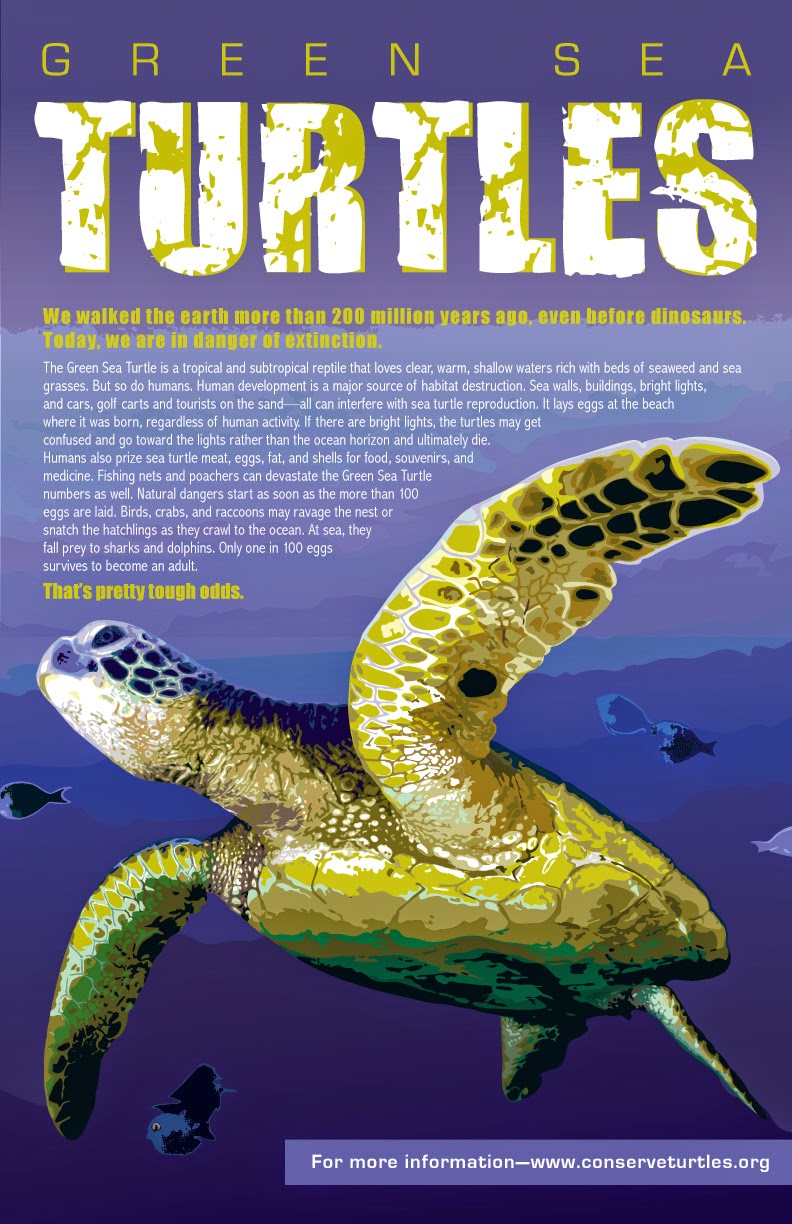
Project #8 — Green Sea Turtles — Poster
This poster was designed to bring attention to Green Sea Turtles and the reasons their existence is in jeopardy.
Changes Suggested:
1. Shorten length of text.
2. Remove stray white ticks at top in background from distressed font.
3. Add hidden layer of brown on fin? (My original illustration had a layer at the base of the larger fin with darker color which had been hidden. Keep these darker accents hidden or show on final project?)
Changes Done:
1. I tried the shorter text. Even though I prefer the next as it follows the edge of the fin at the top, I think the shorter text is clearer and more concise.
2. Done
3. Added hidden layer. Still not convinced which way is better. I think I'm too close to the project to make a decision at the moment. What do others think?
NOTE: I enlarged the turtle a bit so that it extended off the page, trying to create a more dynamic view of the turtle. I also added a drop shadow to the body text. Trying to decide if that helps readability or hinders it.

Changes Suggested:
1. Shorten length of text.
2. Remove stray white ticks at top in background from distressed font.
3. Add hidden layer of brown on fin? (My original illustration had a layer at the base of the larger fin with darker color which had been hidden. Keep these darker accents hidden or show on final project?)
Changes Done:
1. I tried the shorter text. Even though I prefer the next as it follows the edge of the fin at the top, I think the shorter text is clearer and more concise.
2. Done
3. Added hidden layer. Still not convinced which way is better. I think I'm too close to the project to make a decision at the moment. What do others think?
NOTE: I enlarged the turtle a bit so that it extended off the page, trying to create a more dynamic view of the turtle. I also added a drop shadow to the body text. Trying to decide if that helps readability or hinders it.
Sunday, March 29, 2015
Project #7 — Wicked Hangin' Chads Concert — Poster
This project was a poster for my Service Learning client—the Media Arts and Technology Department on MWCC's Gardner campus. Not knowing if most students would know who Wicked Hangin' Chads was as a group, I focused on the type of music they play—rockin' reggae fusion. The concert provided an opportunity for sound and video students to practice recording a concert while also hoping to raise some money for concerts in future years.
Changes Suggested:
1. Make heads not so warped on left and right of picture.
2. Make sure MWCC blues are consistent throughout the piece.
3. Line up blue shape on left edge.
4. Check shadow of Rockin' VS Wicked Hangin' Chads.
5. Dreadlocks guy shirt seems to overlap sleeveless guy's shirt.
6. Should arm be in background near center?
Changes Done:
 I had a hard time unwarping the heads, so I changed the clipping paths on their heads instead. Truth be told, I think that was more of the issue anyway.
I made changes 2-4 as suggested.
On 5, I realized it was a scarf overlapping the sleeveless guy's arm and decided to leave it as is.
For 6, I changed the clipping path to remove the mystery arm behind the sleeveless guy and dreadlocks guy.
Changes Suggested:
1. Make heads not so warped on left and right of picture.
2. Make sure MWCC blues are consistent throughout the piece.
3. Line up blue shape on left edge.
4. Check shadow of Rockin' VS Wicked Hangin' Chads.
5. Dreadlocks guy shirt seems to overlap sleeveless guy's shirt.
6. Should arm be in background near center?
Changes Done:
I had a hard time unwarping the heads, so I changed the clipping paths on their heads instead. Truth be told, I think that was more of the issue anyway.I made changes 2-4 as suggested.
On 5, I realized it was a scarf overlapping the sleeveless guy's arm and decided to leave it as is.
For 6, I changed the clipping path to remove the mystery arm behind the sleeveless guy and dreadlocks guy.
Sunday, March 22, 2015
Project #4 — Best Exotic Marigold Hotel — Final Tweak
I updated the woman's fingers on the front cover. Her fingers were abnormally long and I adjusted them to be more proportional to her other hand. Also, the color on the first one was a little unrealistic, so I tried to tone it down a bit on the second one. (I think I went too far with the brightness and vibrance on the first one.) Both versions are included here for comparison.


Tuesday, March 10, 2015
Project #6—Ed Sheeran Digital Booklet
This booklet was shown in class as a printed booklet, however, it was originally envisioned as a digital booklet. After further review, I decided to return to the digital booklet format.
CHANGES SUGGESTED:
1) Add "PLUS" to the background text on the cover to more clearly state the name of the CD. (Although the singer's actual CD cover never spells it out, I believe.)
2) Show cover and then pull out 1-2 inner layouts of print booklet.
CHANGES DONE:
1) "PLUS" was added as suggested to the cover background text.
2) Rather than just showing the cover and a couple layouts, I reformatted the project so that all pages are visible at one time. This way, a more comprehensive look is available.

CHANGES SUGGESTED:
1) Add "PLUS" to the background text on the cover to more clearly state the name of the CD. (Although the singer's actual CD cover never spells it out, I believe.)
2) Show cover and then pull out 1-2 inner layouts of print booklet.
CHANGES DONE:
1) "PLUS" was added as suggested to the cover background text.
2) Rather than just showing the cover and a couple layouts, I reformatted the project so that all pages are visible at one time. This way, a more comprehensive look is available.
Monday, March 9, 2015
Project #5—VIVID Magazine
VIVID magazine is geared toward people who appreciate vivid color and use it in their artistry. The audience includes florists, photographers, fine artists, quilters and cloth artisans, as well as chefs, all of whom consider color when presenting their work. Because color from one medium may inform how color is used in another medium, the breadth within the audience can inspire artists across many disciplines.Topics include color combinations, sources of colors, why certain colors fade more than others, as well as simply celebrating the range of colors in the world.
SUGGESTED CHANGES:
1) Cover Page—No changes needed.
2) Contents Page—Rotate the boutonniere to more of an angle and possibly reduce it slightly.
3) Spread—Try different colors on ampersand—white, lighter, or skin tone?
4) Spread—Is the drop shadow on "Inspired" the same as used on the other words? It looks too far away from the script lettering.
5) Spread—The blog info needs something (lower right of left page). Draw the green line to the left across the top of the blog info? Add more space above it? Somehow help to separate it visually from the body of the story.
CHANGES MADE:
1) Cover Page—No changes.
2) Contents Page—I have three versions for this page—the original, a little rotated, and more rotated. Each of them presents a different problem for me. The original version with the flower straight up and down looks too static and intersects the group shot awkwardly, but closes up the space above the flower so that the space doesn't look particularly trapped. The slightly rotated version interferes the least with the group shot. However, there is some trapped white space above the flower, to the right of the group shot. The most rotated version is a little looser than the others and creates a more dynamic visual flow on the page, but it has trapped space as well. Does that trapped space bother anyone besides me on the angled versions?
3) Spread—After trying several options, I reduced the opacity of the ampersand from 50% to 30%, using the original color. The skin color looked too dull and white was too much of a contrast, drawing too much attention to it.
4) Spread—I fixed the drop shadow on "Inspired." Good catch!
5) Spread—I ended up changing the fonts of the blog headline and body copy below it, which helped to more clearly distinguish the blog text from the feature article. I also lined up the second line of the headline with the green line to the right. This alignment helps tie them together without making that area too boxy.


SUGGESTED CHANGES:
1) Cover Page—No changes needed.
2) Contents Page—Rotate the boutonniere to more of an angle and possibly reduce it slightly.
3) Spread—Try different colors on ampersand—white, lighter, or skin tone?
4) Spread—Is the drop shadow on "Inspired" the same as used on the other words? It looks too far away from the script lettering.
5) Spread—The blog info needs something (lower right of left page). Draw the green line to the left across the top of the blog info? Add more space above it? Somehow help to separate it visually from the body of the story.
CHANGES MADE:
1) Cover Page—No changes.
2) Contents Page—I have three versions for this page—the original, a little rotated, and more rotated. Each of them presents a different problem for me. The original version with the flower straight up and down looks too static and intersects the group shot awkwardly, but closes up the space above the flower so that the space doesn't look particularly trapped. The slightly rotated version interferes the least with the group shot. However, there is some trapped white space above the flower, to the right of the group shot. The most rotated version is a little looser than the others and creates a more dynamic visual flow on the page, but it has trapped space as well. Does that trapped space bother anyone besides me on the angled versions?
3) Spread—After trying several options, I reduced the opacity of the ampersand from 50% to 30%, using the original color. The skin color looked too dull and white was too much of a contrast, drawing too much attention to it.
4) Spread—I fixed the drop shadow on "Inspired." Good catch!
5) Spread—I ended up changing the fonts of the blog headline and body copy below it, which helped to more clearly distinguish the blog text from the feature article. I also lined up the second line of the headline with the green line to the right. This alignment helps tie them together without making that area too boxy.


Monday, March 2, 2015
Project 4—The Best Exotic Marigold Hotel
This project's audience is anyone who enjoys quirky movies about exotic places—India in this case. Although the movie appeals to people in their 50s and older, the enthusiasm and love interest of the younger characters could draw in a younger crowd as well.
The suggested changes mostly focused on the front art. The input ranged from making the gate and the girl on the front larger, flipping the girl so she was facing left, and keeping the architectural interest but replacing the girl altogether. There was also a suggestion to include the flowers, from the lower portion of the back, and placing more on the front.
The following adjustments were done:
1) I added a smaller marigold in the lower left corner of the front cover. This addition does two things: It adds some unity between the front and the back covers. It also covers the lower left edge of the image with the girl, covering the fact that the interesting doorway trim didn't continue down the left side of that image.
2) I flipped the girl to face left, enlarged her slightly, and brightened her so she wasn't so much in the background.
3) I decided to keep the girl on the front, rather than using an entirely different image within the doorway, to help place the location of the movie more clearly in India. Most people associate saris with India or that part of the world and I wanted to maintain that connection.

3/22/15
NOTE: I modified her fingers on the front just a bit. They looked abnormally long on the above version. Although they seem short on the version below, I think they are more in keeping with the fingers on both hands. Minor issue, but what do you think?

The suggested changes mostly focused on the front art. The input ranged from making the gate and the girl on the front larger, flipping the girl so she was facing left, and keeping the architectural interest but replacing the girl altogether. There was also a suggestion to include the flowers, from the lower portion of the back, and placing more on the front.
The following adjustments were done:
1) I added a smaller marigold in the lower left corner of the front cover. This addition does two things: It adds some unity between the front and the back covers. It also covers the lower left edge of the image with the girl, covering the fact that the interesting doorway trim didn't continue down the left side of that image.
2) I flipped the girl to face left, enlarged her slightly, and brightened her so she wasn't so much in the background.
3) I decided to keep the girl on the front, rather than using an entirely different image within the doorway, to help place the location of the movie more clearly in India. Most people associate saris with India or that part of the world and I wanted to maintain that connection.
3/22/15
NOTE: I modified her fingers on the front just a bit. They looked abnormally long on the above version. Although they seem short on the version below, I think they are more in keeping with the fingers on both hands. Minor issue, but what do you think?
Sunday, March 1, 2015
Project 3—Minor Rework


After some thought, I went back to having the "slow is not a choice" centered. I think it gives a clearer progression of the order I want readers to read the text. I want the links to be read last and for "slow is not a choice" to stand more on its own and to be an answer to the text above it.
I think I will be going with the LEFT version with no glow in the black bar. It gives a crisper look at various sizes. While I like the glow, it was really just a matter of layering rather than an added effect. I think it works fine overall without it.
Monday, February 23, 2015
Project 2—8.5x11 PSA
This PSA (Public Service Announcement) is designed to run as a magazine ad. Its audience is primarily educators and parents of kids with slow processing speed.
Suggested changes included the following:
1) The "IMAGINE" text grabs the readers attention, but will readers stop and read the "if your thoughts..." text? It is harder to read.
a) Make background whiter or text white
b) Loosen text so it is not so tight
2) Move "SLOW IS NOT A CHOICE" to the lower right to play with asymmetry.
I tried a couple different options and am curious to hear input on them.
LEFT—The percentage of the white background was almost doubled to make it more opaque, but nothing else was changed. I liked keeping the text tight and black to group all of the black text, including IMAGINE, as one thought. Also, with the white background, it commands less attention.
RIGHT—I spread out the leading of the text, changed the background to black with a small amount of gold glow below IMAGINE to add some dimensionality to it, and moved the SLOW IS NOT A CHOICE logo to the lower right. I didn't think I would like the logo in the lower right but I actually think it is better, creating asymmetry as well as allowing the background art to be more emphasized.
NOTE: My #3 project is an update of a website and will have much more time to complete.


Suggested changes included the following:
1) The "IMAGINE" text grabs the readers attention, but will readers stop and read the "if your thoughts..." text? It is harder to read.
a) Make background whiter or text white
b) Loosen text so it is not so tight
2) Move "SLOW IS NOT A CHOICE" to the lower right to play with asymmetry.
I tried a couple different options and am curious to hear input on them.
LEFT—The percentage of the white background was almost doubled to make it more opaque, but nothing else was changed. I liked keeping the text tight and black to group all of the black text, including IMAGINE, as one thought. Also, with the white background, it commands less attention.
RIGHT—I spread out the leading of the text, changed the background to black with a small amount of gold glow below IMAGINE to add some dimensionality to it, and moved the SLOW IS NOT A CHOICE logo to the lower right. I didn't think I would like the logo in the lower right but I actually think it is better, creating asymmetry as well as allowing the background art to be more emphasized.
NOTE: My #3 project is an update of a website and will have much more time to complete.
Sunday, February 8, 2015
Project 1—Fish Design—Addendum
I am aware we need to be careful of not being repetitive in our portfolio. What is the best way to handle a series of designs that all fit within a theme? Based off of the fish design done in my Multi-Media Design class, I was contracted by MWCC to design a series of posters, table tents, web banners, and bookmarks for the school.
How do I show the breadth of the project without boring the audience silly? Below are the followup designs I created after the original fish design. Which, if any, would you include in a portfolio? And for the ones to include, are there any changes you would recommend?
NOTE: The web banner with the blocks was requested by the client. It has bothered me that there was too much tiny text on it. Considering that the banner is seen every time anyone logs onto iConnect, I suggested a change with I hope they will upload sometime soon. The change is included below.
The advising page—http://mwcc.edu/advising/workshops/—shows the tiny text that was removed on the second series I designed.


How do I show the breadth of the project without boring the audience silly? Below are the followup designs I created after the original fish design. Which, if any, would you include in a portfolio? And for the ones to include, are there any changes you would recommend?
NOTE: The web banner with the blocks was requested by the client. It has bothered me that there was too much tiny text on it. Considering that the banner is seen every time anyone logs onto iConnect, I suggested a change with I hope they will upload sometime soon. The change is included below.
The advising page—http://mwcc.edu/advising/workshops/—shows the tiny text that was removed on the second series I designed.
 |
| "Coming together is a beginning; keeping together is progress; working together is success. —Henry Ford |
 |
| If you don't design your own life plan, chances are you'll fall into someone else's plan. —Jim Rohn |
 |
| College is part of the American dream. It shouldn't be part of a financial nightmare for families. —Barbara Mikulski |
 |
| Keep your dream close and you'll go as far as the stars. —Joseph Farmer |
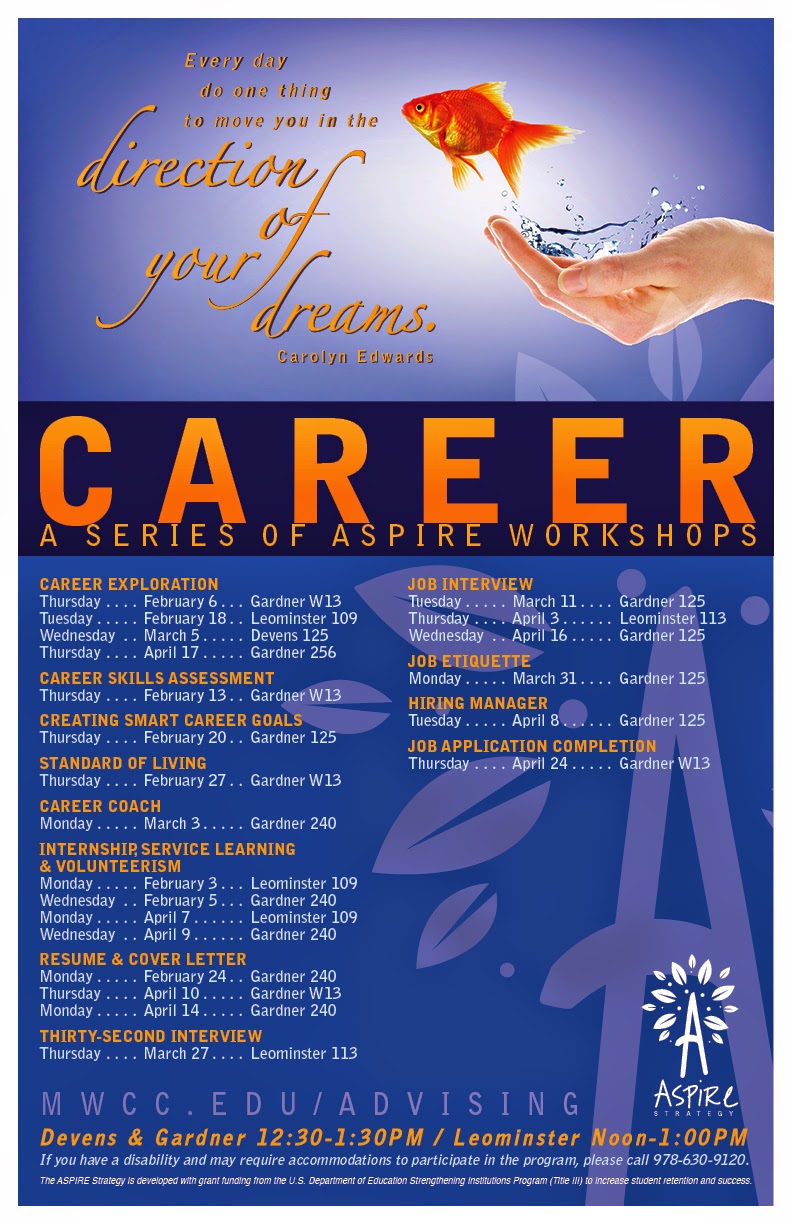 |
| Every day do one thing to move you in the direction of your dreams. —Carolyn Edwards |
 |
Recently revised web banners. |
 |
Topic art on the Advising webpage. |
 |
Five bookmarks (front and back)—5-up. |
 |
| Monthly table tents (finished products are folded in half). |
Subscribe to:
Posts (Atom)